How to add personal audio with aRboretum
Including one additional
community language with add_lang
Martin Boucknooghe & Domingos Cardoso
2026-10-05
Source:vignettes/howto_audios.Rmd
howto_audios.RmdIntroduction
The aRboretum package can read species descriptions
aloud using the browser’s built-in text-to-speech (TTS) engine. For a
more natural and locally meaningful experience, you can replace
synthetic speech with personal audio recordings made by a botanist,
guide, teacher, student, or community member.
This workflow is especially useful in participatory outreach and co-developed interpretive projects. It is also useful when collaborators want to include one additional community language in species labels and associated audio without translating the full website or minisite interface.
This vignette shows you how to:
- prepare a species dataset and its phrases for label generation;
- create the folder structure for personal audio recordings with
arboretum_audios(); - optionally add one extra language with
add_lang; - organize audio recordings in the expected folders;
- generate HTML labels with
arboretum_labels()so they use personal audio whenever available.
Prerequisites
Before starting, make sure you have:
-
aRboretuminstalled (see the installation section of the quickstart article); - a species dataset generated with
arboretum_data()and completed with phrases byarboretum_phrases(); - a phone or microphone to record audio;
- optional recording/editing software such as Audacity or QuickTime;
- species label text prepared in any additional community language if
you want to use
add_lang.
Mine the species data
If you have not already done so, first generate your species dataset
with arboretum_data().
library(aRboretum)

species_list <- c("Luetzelburgia bahiensis", "Paubrasilia echinata")

arboretum_data(
  spp_list = species_list,
  save = TRUE,
  format = "xlsx",
  dir = "arboretum_data"
)
This creates a folder containing your input spreadsheet and a data reviewing guide:
arboretum_data/
├── arboretum_data.xlsx
└── __data_reviewing_guide.html
Review and enrich the data, in the spreadsheet or in the guide, then generate the species phrases, which are the texts you will record:
arboretum_phrases(
  data_path = "arboretum_data/arboretum_data.xlsx",
  printed_lang = c("pt", "en")
)
The phrases are stored in the full_phrases_* columns of
the data file and can be edited there or in
arboretum_data/__phrase_generating_guide.html. Finish
editing them before recording, because the recording guide shows exactly
these stored phrases.
Optional: add one extra community language
The built-in package languages are Portuguese ("pt"),
English ("en"), French ("fr"), and Spanish
("es"). In some projects, however, you may want to include
species text and audio in one additional community or local language
without translating the full interface.
For this purpose, arboretum_phrases(),
arboretum_audios() and arboretum_labels()
support the argument add_lang.
A typical example is collaboration with Indigenous peoples, where the website can remain in one of the built-in interface languages, but the species label itself should also be available in a language such as Panará or Tukano.
To do this, run arboretum_phrases() with
add_lang, which creates the column
full_phrases_ADD_LANGUAGE in your dataset and an editable
field for it in the phrase guide. Fill it with the complete final text
to be shown in the extra language.
arboretum_phrases(
  data_path = "arboretum_data/arboretum_data.xlsx",
  printed_lang = c("pt", "en"),
  add_lang = "TUKANO"
)
The relevant columns then look like this:
example_df <- data.frame(
  taxonName = c("Paubrasilia echinata", "Euterpe edulis"),
  family = c("Fabaceae", "Arecaceae"),
  full_phrases_ADD_LANGUAGE = c(
    "Texto completo em Tukano para Paubrasilia echinata.",
    "Texto completo em Tukano para Euterpe edulis."
  )
)
This extra language text is read directly by
arboretum_labels(). It does not pass through the standard
multilingual phrase-generation workflow.
Create the audio folder structure and recording guide
Run arboretum_audios() with the path to your dataset and
the languages you want to support.
The function will:
- create a directory named
arboretum_audios/; - create one subfolder per species and per language using the format
FAMILY_Genus_species_LANG(e.g.,FABACEAE_Paubrasilia_echinata_ENfor English); - create an HTML guide named
__personal_audio_recording_guide.htmlto help navigate species and languages during recording; - optionally create one extra folder per species for the language
supplied in
add_lang.
arboretum_audios(
  data_path = "arboretum_data/arboretum_data.xlsx",
  printed_lang = c("pt", "en"),
  add_lang = "TUKANO",
  verbose = TRUE
)
The resulting structure may look like this:
arboretum_audios/
├── ARECACEAE_Euterpe_edulis_EN/
├── ARECACEAE_Euterpe_edulis_TUKANO/
├── ARECACEAE_Euterpe_edulis_PT/
├── FABACEAE_Paubrasilia_echinata_EN/
├── FABACEAE_Paubrasilia_echinata_TUKANO/
├── FABACEAE_Paubrasilia_echinata_PT/
└── __personal_audio_recording_guide.html
The extra TUKANO folders are created only because
add_lang = "TUKANO" was supplied.
Important: The recording guide is rewritten every time you run
arboretum_audios(), from the phrases currently stored by
arboretum_phrases(). The species folders are only created
when arboretum_audios/ does not exist yet, so audio files
you already placed in them are never overwritten. To add folders for new
species or languages, rename or remove the existing
arboretum_audios/ folder first.
Record your audio files
Open the recording guide:
arboretum_audios/__personal_audio_recording_guide.html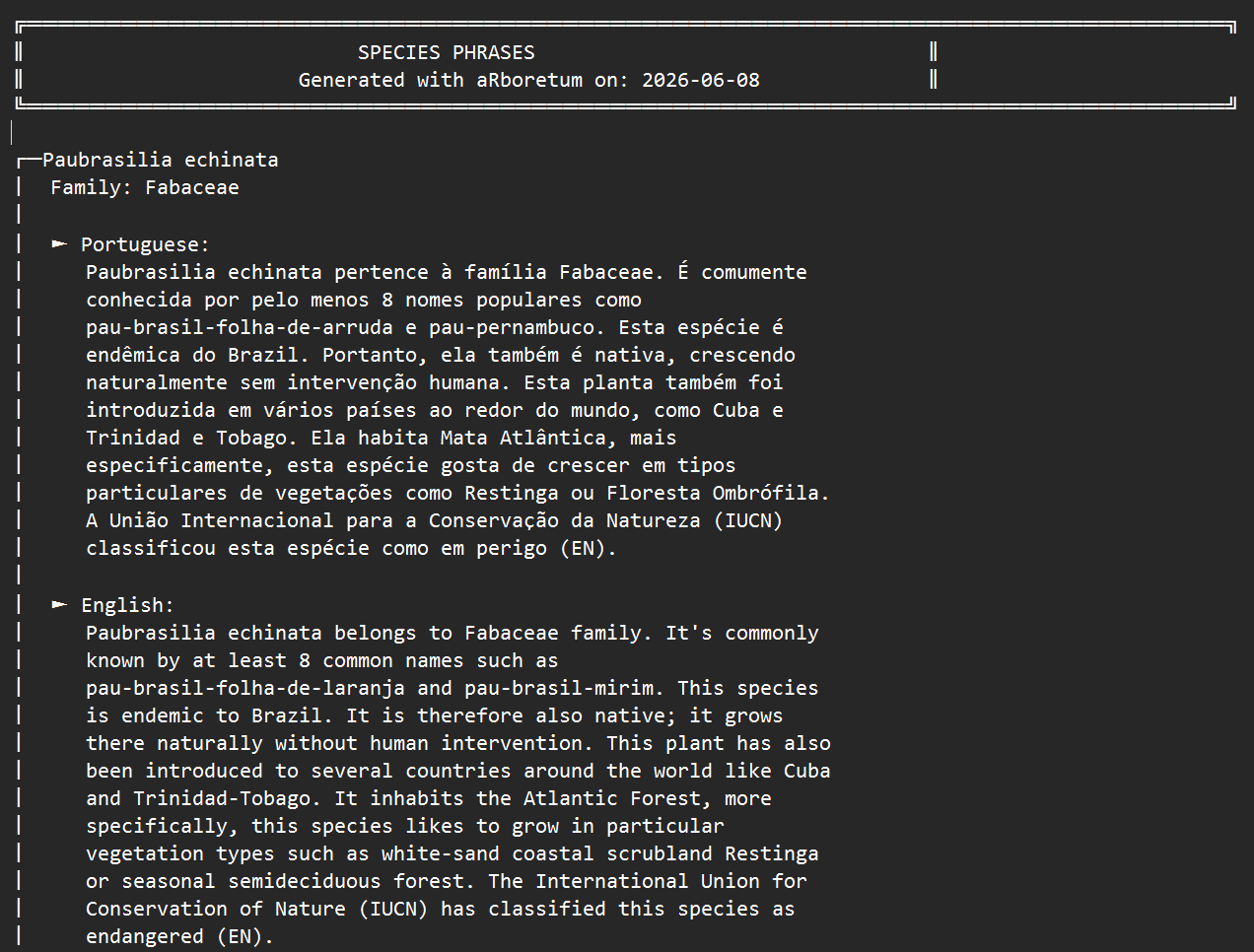
Example of species phrases to record (here for Paubrasilia echinata (en; pt))
The guide shows, for each species and language, the phrase to read, followed by the plant uses and notes, exactly as they will appear in the labels. Use the search field and the index to move between species.
Recording from the guide
In Chromium-based browsers (Chrome, Edge), the guide can record directly into the species folders:
- click Choose audio folder and select the
arboretum_audios/folder; - click Record under a phrase, read it aloud, and click Stop.
The recording is saved as a .webm file in the matching
species and language folder. Browsers may only allow this when the page
is opened from localhost or an HTTPS address; otherwise,
record with another application and copy the files as described
below.
Adding audio files yourself
For each species and language you want to support, place one audio file inside the matching folder. Accepted file formats include MP3, WAV, M4A, OGG, FLAC, and WEBM.
Example:
arboretum_audios/FABACEAE_Paubrasilia_echinata_EN/my_recording.mp3arboretum_audios/FABACEAE_Paubrasilia_echinata_PT/minha_gravacao.wavarboretum_audios/FABACEAE_Paubrasilia_echinata_TUKANO/tukano_recording.m4a
There is no required file name, any audio file in the folder will be detected (if multiple files are present, the first one alphabetically is used).
Generate the HTML labels (with personal audio)
Now run arboretum_labels() and point it to the audio
folder using audio_dir.
The function will:
- generate one HTML label per species, using the phrases stored by
arboretum_phrases()(every language inprinted_langmust have its phrases); - copy the personal audio folder into the label output directory;
- use personal recordings when they exist;
- fall back to browser TTS when no personal recording is available;
- add the extra language when
add_langis supplied andfull_phrases_ADD_LANGUAGEcontains non-empty text.
arboretum_labels(
  data_path = "arboretum_data/arboretum_data.xlsx",
  audio_dir = "arboretum_audios",
  printed_lang = c("pt", "en"),
  add_lang = "TUKANO",
  dir = "arboretum_labels",
  verbose = TRUE
)
What happens in the final labels
After running arboretum_labels():
- Portuguese and English texts are the phrases stored by
arboretum_phrases(); - Tukano text is read directly from
full_phrases_ADD_LANGUAGE; - Tukano appears as an additional language option in the HTML labels when that column contains text;
- personal recordings are used whenever available;
- when no personal recording exists, the label falls back to browser TTS.
For additional languages supplied with add_lang, browser
speech synthesis may not work reliably unless the operating system
provides a compatible voice. Personal recordings are therefore strongly
recommended for the extra language.
Output structure
A typical output directory looks like this:
arboretum_labels/
├── __arboretum_audios/
│   ├── FABACEAE_Paubrasilia_echinata_EN/
│   │   └── my_recording.mp3
│   ├── FABACEAE_Paubrasilia_echinata_TUKANO/
│   │   └── tukano_recording.m4a
│   ├── FABACEAE_Paubrasilia_echinata_PT/
│   │   └── minha_gravacao.wav
│   └── ...
├── FABACEAE_Paubrasilia_echinata_label.html
└── FABACEAE_Luetzelburgia_bahiensis_label.html
The leading __ in the copied audio folder helps avoid
conflicts with the generated label files.
Minimal schema for the add_lang workflow
For a custom-language workflow such as
add_lang = "TUKANO", the most important requirement is a
column named full_phrases_ADD_LANGUAGE.
A minimal toy example is:
tukano_example <- data.frame(
  taxonName = c("Paubrasilia echinata", "Euterpe edulis"),
  family = c("Fabaceae", "Arecaceae"),
  full_phrases_ADD_LANGUAGE = c(
    "Texto completo em Tukano para Paubrasilia echinata.",
    "Texto completo em Tukano para Euterpe edulis."
  ),
  stringsAsFactors = FALSE
)
A more realistic file may also include built-in language notes and uses:
tukano_example <- data.frame(
  taxonName = c("Paubrasilia echinata", "Euterpe edulis"),
  family = c("Fabaceae", "Arecaceae"),
  plant_uses_PT = c("Madeira e uso ornamental.", "Alimentação e paisagismo."),
  free_notes_PT = c("Espécie simbólica no Brasil.", "Espécie importante da Mata Atlântica."),
  full_phrases_ADD_LANGUAGE = c(
    "Texto completo em Tukano para Paubrasilia echinata.",
    "Texto completo em Tukano para Euterpe edulis."
  ),
  stringsAsFactors = FALSE
)
Why add_lang matters
The add_lang argument provides a flexible, interim
pathway for including one additional community or local language in
species labels and associated audio, without requiring translation of
the full website or minisite interface.
This makes it particularly valuable in collaborative work with Indigenous peoples and other communities, where species-level accessibility may be more important than full interface translation.
Next steps
You can combine this workflow with custom photos (see the howto_photos article) and a searchable
minisite built with arboretum_minisite() (see the quickstart article) to build a richer
collection of digital species labels.